Surface - Texture painting for Windows _□✕

Surface

Paint, bake and weather your 3D models. Smart materials, procedural wear and game-ready textures in a few clicks.

Download SurfaceVersion 2.3.0 for Windows

Free. Windows 10 / 11, 64-bit. Updates itself automatically.
All versions on GitHub

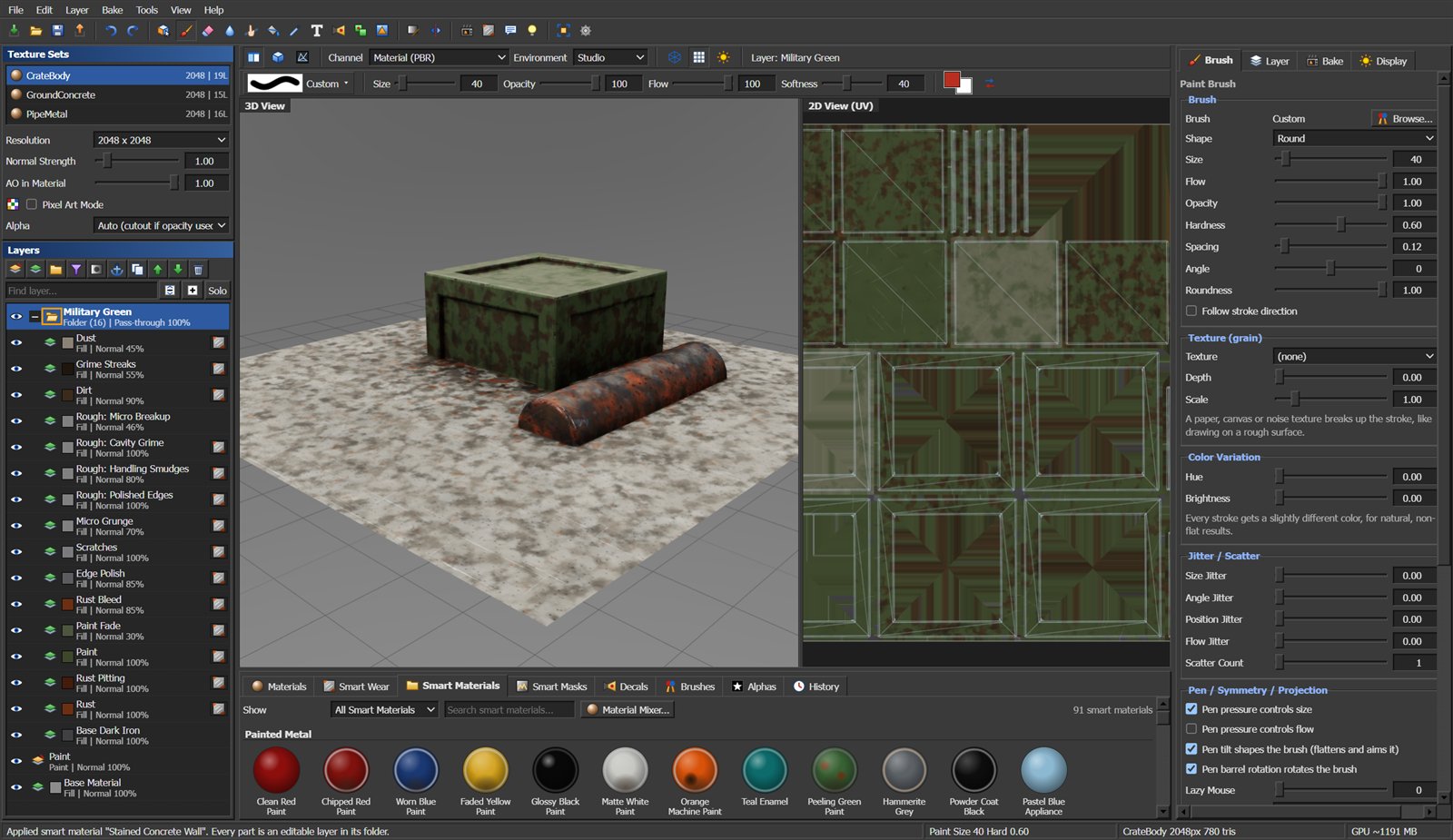
Surface with a smart material applied to a crate, layer stack and smart material shelf
Features
Paint in 3D and 2D

Paint straight on the model or on the UV layout, side by side. Pen pressure, tilt and twist, lazy mouse, symmetry and a brush bar for size, opacity, flow, softness and color.

100 brushes

Pencils, inks, bristle, chalk, charcoal, sponge, spatter, rust, dirt, scratches, rivets, bolts, weld beads and more. Paper and canvas grain, smudge, blur and sharpen. Make your own from any picture.

91 smart materials

Painted metal, rusty iron, military, sci-fi with glowing lines, brass and bronze, wood, concrete, plastic, leather, snow and moss. One click builds a full editable layer stack.

Procedural wear

Edge wear, scratches, dirt, dust, rust, grime streaks and roughness wear driven by baked curvature and occlusion. Every part stays an editable layer with a live mask.

Mesh baking

Ambient occlusion, curvature, shadow, thickness and bent normals on the GPU, plus high-poly normal and ID bakes through Blender with an adjustable cage.

Material Mixer

Stack up to three materials and choose where each one shows: worn edges, cavities, top, bottom, patches or selected parts. The model updates live while you tweak.

Parts and regions

Click loose parts, angle regions or UV islands of a single mesh and give each its own smart material. Masks stay editable and save with the project.

Decals and text

Drag decals onto the model, then move, resize and rotate them right on the surface. Custom images with automatic background removal, your own fonts and text labels.

Surface detail

Brushed metal, cast iron, carbon fiber, tread plate, concrete pores, wood planks and more as real relief with matching color and roughness. Seamless on any model.

Material check

A view that flags physically wrong values: colors too dark or bright, dark metals, half-metal areas. With a live legend and tips to fix them.

Import anything

.blend, FBX, OBJ, glTF, USD, Alembic, STL and more. Smart unwrapping, UDIM tiles, and tiling UVs fixed automatically on just the parts that need it.

Game-ready export

Presets for Unity, Unreal, glTF and Blender, your own channel packing, texel density matching, pixel art mode and a path traced render for showcase images.

Screenshots
Surface screenshot

Smart materials: one click builds a complete, editable layer stack.

What's New
Surface 2.3.0November 2026
  • Automatic updates: Surface checks for new versions on start and every 4 hours and offers a one-click install.
  • Help > Check for Updates any time; Edit > Preferences to turn automatic checks off.
Surface 2.2.0November 2026
  • 91 built-in smart materials in 12 categories, with search and category filter.
  • 23 new effect layers: moss, snow, frost, soot, oil, verdigris, heat tint, glow lines and more.
Surface 2.1.0November 2026
  • Tiling UVs detected on import and fixed for just those parts.
  • Layer search, solo and collapse/expand all.
  • Roughness wear, procedural surface detail, Material Mixer, Material Check view.
System Requirements
MinimumRecommended
WindowsWindows 10, 64-bitWindows 11, 64-bit
GraphicsAny GPU with WebGL 2, 2 GB video memory4 GB+ video memory for 4K textures
Memory8 GB RAM16 GB RAM
Disk300 MB for SurfacePlus space for your projects
BlenderOptional, 3.6 or newer: needed for .blend / USD / Alembic import, unwrapping, high-poly baking and FBX / .blend export. Surface finds it automatically.
InternetOnly for downloading updates.
Download Surface ✕
Download for WindowsVersion 2.3.0, 79 MB

Surface is a Windows desktop app. On a phone? Bookmark this page and open it on your PC.

How to install
  1. Run Surface-Setup.exe from your Downloads folder.
  2. If Windows shows "Windows protected your PC", click More info, then Run anyway. This appears because the installer is not code-signed yet.
  3. Pick an install folder (or keep the default) and click Install. Surface adds a desktop shortcut and a Start menu entry.
  4. Future versions install themselves: Surface shows a popup when an update is ready.